Integrate Facebook Leads with Keap (InfusionSoft)
Syncing leads from Facebook Lead Ads to Keap (formerly InfusionSoft) can now be achieved with LeadSync. This 2 minute video will shows you how.
How to synchronise Facebook Leads with Keap (InfusionSoft):
- Login to LeadSync.me with your Facebook Profile
- Go to Connections
- Click on Add Connection.

- Select InfusionSoft from the Connections dropdown menu
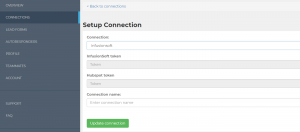
-
Login to InfusionSoft and approve the application access request
-
Map the Facebook Lead form elements to your InfusionSoft list
-
Name your connection
-
Click on Lead Forms section
-
Click Add Facebook Lead Form

-
Select the Facebook Page that’s hosting the Lead Form – you’ll need page admin rights (not advertiser rights).
-
Select the Lead form you’ve already created
-
Select the InfusionSoft connection you just added, and bob’s your uncle.
Here's how to test your connection. This should add a test lead to Keap (Infusionsoft).
Connect Facebook / Meta Leads to Keap
Start syncing leads from your ad platform in under 2 minutes. No credit card required.
Start Free Trial